Website name: 米序信息

A desktop business workspace for manufacturing teams

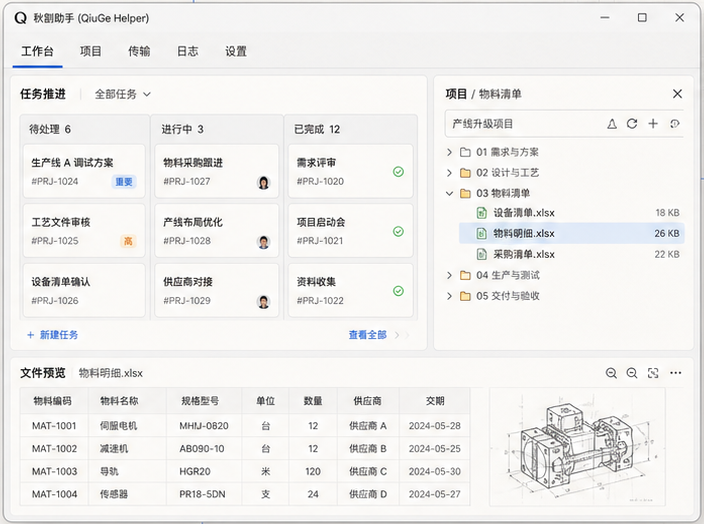
Use one local-first desktop shell to hold task collaboration, mold and project management, the file workbench, invitation-code licensing, and multi-workspace switching in the same operational surface.

Windows-first deliveryLocal-first and weak-network readyInvitation-code module licensingBuilt-in file workbench and site transfer
QiuGe Helper workbench illustration
Current version0.4.8
Latest update2026-08-22
Capability Map

Bring business objects, task execution, and file flow back into one desktop workflow

The current release focuses on shipped manufacturing-team workflows across tasks, projects, molds, products, customers, and the file workspace. The site only describes what already exists.

Unified Workbench

Unified workspaces and server switching

One server entry maps to one workspace. Business pages, tools, and discovery switch inside the same desktop shell to minimize restarts, re-logins, and context loss.

  • Restore the last page and expanded navigation state
  • Fall back to the local workspace when a remote one is unreachable
  • Global modules such as Discovery and Tools stay available across server switches
Task Collaboration

Task collaboration and board flow

Regular and recurring tasks are licensed separately, while create, view, and edit all converge into a single work modal. The board, attachment preview, and task pool are designed for ongoing manufacturing execution.

  • Double-click opens a read-only detail state and switches to edit in place
  • Board columns and task pool state persist both locally and on the server
  • Preview attachments and summaries directly from task cards
Business Modules

Business modules for molds, projects, products, and customers

The current object-management surface already spans mold management, mold development, modification tracking, projects, products, customers, suppliers, and materials.

  • Unify read-only detail and edit mode instead of stacking drawers and popovers
  • Inspect related objects from the same work-modal flow
  • Version records and restore flow already exist for molds and products
File Workbench

A Windows-first file workbench

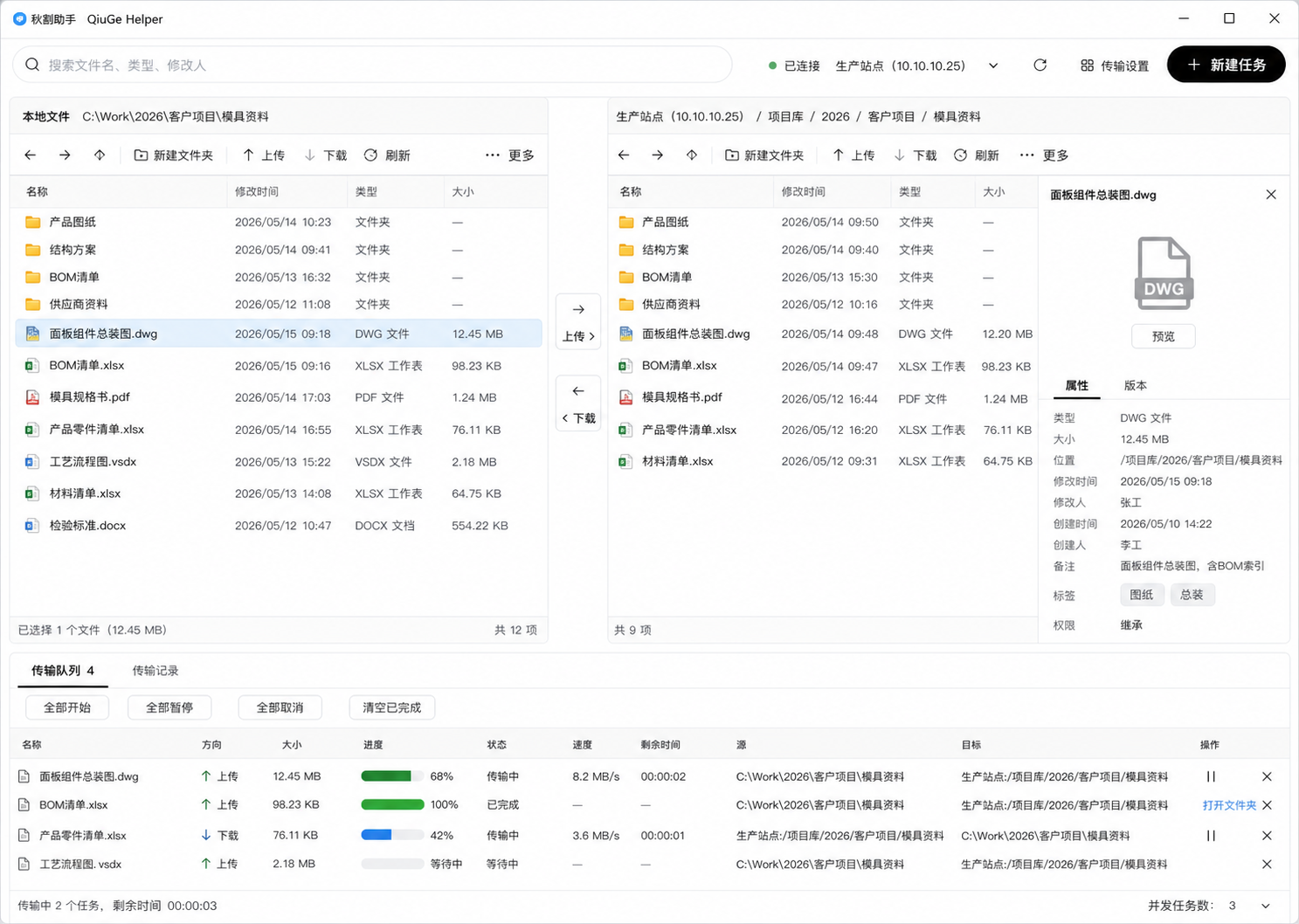
The tool workspace bundles File Assistant and LAN Assistant for local organization, site connection, remote browsing, transfer queues, and in-app preview or editing for common file types.

  • Open PDF, spreadsheets, Word, code, JSON, images, audio, and video inside the workbench
  • FTP / FTPS / SFTP transfer and synchronized browsing
  • Save remote files through a local working copy before write-back
Access Control

Offline licensing driven by invitation codes

Module availability comes from invitation-code tiers plus local activation records, which fits offline licensing, weak-network deployment, and module-based desktop product packaging.

  • Free, PLUS, and PRO can each toggle submodules with boolean switches
  • Admin users can refresh permissions in-session after switching invitation codes
  • Menus, routes, and APIs follow the same authorization boundary
Desktop Quality

Local-first behavior and desktop stability

The application ships with built-in data and service behavior, restores sessions and workspace state on startup, and keeps improving long-running desktop usage under weak-network conditions.

  • The welcome screen absorbs startup to reduce white flashes and hard transitions
  • Retry session recovery when the server is briefly unavailable
  • Large previews prefer cached files and main-process descriptors
Why It Fits

This is not generic office SaaS. It is a desktop workspace designed around manufacturing realities.

The unified work modal, invitation-code licensing, site transfer, file workbench, and multi-server workspace switching all exist because the product is built for long-running desktop sessions, local data, and tightly linked business objects.

FTP / FTPS / SFTPUse one tool workspace for site connection, browsing, and transfer
Local-firstBuilt-in database and session recovery keep the app usable on weak networks
Workspace ShellWorkspaces, tools, and discovery live inside one desktop shell
QiuGe Helper file workbench illustration
Scenarios

Three rollout scenarios that match the current release best

Daily coordination for mold factories and manufacturing teams

Keep molds, projects, products, customers, and tasks inside one workspace instead of bouncing between spreadsheets, chat, shared folders, and separate local tools.

  • Tasks and business objects stay linked in one desktop flow
  • Detail, edit, version history, and attachments stay inside the unified modal pattern
  • Authorization boundaries remain clear for admins and modules

File movement and remote site operations

Handle local files, remote directories, production assets, drag-and-drop transfer, preview, editing, synchronized browsing, and shortcut management inside one tool workspace.

  • Track upload, download, overwrite decisions, and retries through one queue
  • Open common file formats without leaving the app
  • Restore recent sites, paths, and synchronized browsing state automatically

Local deployment, weak-network use, and module-based delivery

The current product fits desktop software that needs offline licensing, a local database, weak-network operation, and long-running workstation usage.

  • Activation history and module snapshots stay in the local database
  • Restore session, server entry, and workspace context after restart
  • Windows remains the primary delivery target
Latest Updates

Recent releases have gone deeper on the tool workspace and desktop stability

These notes come straight from shipped releases and stick to user-visible changes.

v0.4.8

Windows downloads and updates are more stable

Official installers are separated from candidate build artifacts, and update metadata is written in release order to reduce temporary or incomplete download states.

v0.4.7

The AI assistant returned to a stable runtime baseline

A verified Hermes Agent runtime baseline was restored, fixing cases where the AI assistant could exit immediately after startup on some Windows installations.

v0.4.6

Windows AI assistant runtime checks were strengthened

Installer validation now completes two Agent conversations through the same session path as the production app and restores the full offline Agent runtime package.

v0.4.5

Hermes Agent first startup is more reliable

This release fixes first-session failures in the Windows AI assistant and gives slower devices more time to finish loading the offline Agent runtime.

v0.4.4

Installer validation and offline Agent startup are steadier

Windows installer and update publishing now include stronger integrity checks, and offline Agent startup validation reduces missing-runtime failures.

v0.4.3

Mold attachments, task boards, and Agent permissions improved

Mold development and repair attachments now use real uploads, task boards and business tables were refined, and Agent file permissions were tightened into enforceable boundaries.

v0.4.2

Dashboard and personal workspace experience upgraded

The dashboard moved to a vertical long-page layout, while offline business permissions, first AI-message latency, cloud team binding prompts, and local directory saving were fixed.

v0.4.1

Workspace host identity and install templates were fixed

This release fixes account session binding, team host guidance, and installer database template identity issues so new installs do not overwrite or mix workspace identities.

v0.4.0

Agent workspace and unified management workbenches launched

The AI assistant moved to a new Agent execution base, business modules consolidated into dense management workbenches, and task, quotation, permission, and collaboration capabilities expanded.

v0.3.33

AI智能体工作台上线,文件助手交互继续补强

AI 助手新增 Agent 工作台、业务编辑草稿和浏览器调试桥,文件助手的新建目录与拖拽投放提示也一起补齐。

v0.3.22

文件助手支持建目录与上移投放,反馈窗口不再挡住操作

文件助手可直接新建目录,文件和文件夹也能拖到上一级目录,反馈窗口添加截图后底部操作区保持可见。

v0.3.20

反馈截图粘贴更顺手,官网更新记录补齐

意见反馈窗口可以更直接地粘贴截图,官网也补齐近期版本记录和首页更新摘要。

v0.3.19

意见反馈窗口补齐,局域网附件接收更稳

应用内可以直接填写反馈类型、复现步骤和附件信息,局域网聊天接收附件的二进制处理也更稳定。

v0.3.18

使用反馈入口上线,离线账号也能加入共享工作台

头像菜单新增独立反馈窗口,离线使用可携带工作台邀请码进入共享工作台,窄窗口下的文件表格也更顺手。

v0.3.17

Shared workspace joining became more direct, and default-workspace management became steadier

The login page can now carry connection details and invite codes into shared-workspace joining, while default-workspace member management and profile persistence behave more reliably.

v0.3.16

The login page can launch shared-workspace joining, and image flows keep improving

Shared-workspace entry moved onto the login page, and image generation, editing, default-workspace management, and switching stability all improved together.

v0.3.15

The AI image home and in-page editing flow now connect end to end

The image entry, history, editing toolbar, and elapsed-time feedback now form one smoother path, and generation or editing can return to the conversation timeline.

v0.3.14

Login, offline use, and shared-workspace joining were separated into clearer flows

Cloud login no longer mixes in workspace invite codes, personal offline use can enter directly, and admins can copy full connection details for members in one step.

Windows-first Delivery

Start from the current release with the Windows installer

The primary download artifact is QiuGe-Helper-Setup-0.4.8.exe. If you want to review the capability map first, browse the product pages and docs before deciding how to roll it into a real team flow.